scale_minmax <- function(x, a = 0, b = 255) {
x_new <- a + (x - min(x)) * (b - a) / (max(x) - min(x))
round(x_new, 0)
}
measured_ndvi <- seq(-1, 1, 0.1)
stored_value <- scale_minmax(measured_ndvi)Raster data on disk
Spatiotemporal Data Science · FS26
Today
- GDAL CLI — what it is, when to use it, how commands are structured
- Raster data types — choosing the right type, rescaling, scale/offset
- gdal raster info — inspecting raster files from the terminal
- NoData — how missing values are stored on disk
- Categorical rasters — integer encoding + attribute tables
- Compression — lossless compression with
gdal raster convert - Reprojection — changing CRS with
gdal raster reproject
GDAL CLI
GDAL CLI
- GDAL is the basis for most GIS software — we can also call it directly from the terminal
- Ships several raster programs, each designed for a specific task
- Advantages over R / Python: faster, memory-efficient, composable, portable
- Install via conda:
When does GDAL CLI shine?
- Reprojection: Block-by-block — no full load into RAM → fast!
- Format conversion: no full load into RAM → fast!
- Extracting file info: Instant, no environment startup — great for quick access
- Batch processing: One shell loop over hundreds of files; no memory accumulation
- Mosaicking: Combining hundreds of tiles stays out of RAM entirely
- Building overviews: Purely structural file operation
- Pipelines / CI: Slots into shell scripts, Makefiles, CI/CD without an R/Python runtime
Which CLI tools do you already use?
conda— manage environments and packagespip— install Python packagesgit— version control
Anatomy of a CLI call
program    subcommand    flag  flag-value     argument
   ↓           ↓          ↓       ↓             ↓
conda     install         -c   conda-forge     gdal
⎺⎺⎺ ⎺⎺⎺⎺⎺ ⎺⎺ ⎺⎺⎺⎺⎺⎺⎺ ⎺⎺- Program — the tool being called
- Subcommand — the action to perform (not all tools have these)
- Flag — modifies behaviour;
-cis shorthand for--channel - Flag value — the value passed to a flag
- Argument — positional value the command operates on (no
-prefix)
New GDAL API
- Prior to GDAL 3.11, the suite of GDAL programs had a highly inconsistent API
- With 3.11, GDAL introduced a unified CLI entry point —
gdal <noun> <verb> - The new API is great, but WIP
- Our examples use the new API
- See webinar GDAL Command Line Interface Modernization
| Task | Old API | New API (3.11+) |
|---|---|---|
| Inspect | gdalinfo |
gdal raster info |
| Convert | gdal_translate |
gdal raster convert |
| Reproject | gdalwarp |
gdal raster reproject |
Input → output
GDAL is non-destructive by design — it always reads from a source and writes to a new destination:
gdal raster reproject --dst-crs EPSG:2056 input.tif output.tif
                                           ─────────  ──────────
source new file, never touches source- The original file is never modified
- Every operation requires both
<input>and<output>arguments - Consequence: you need roughly 2× the disk space during processing
Exception: gdal edit — metadata-only changes (CRS, NoData, scale/offset) can be applied in place
Raster data types
Raster data types
- Raster data on disk is always stored as numeric (no strings, no factors)
- Many numeric data types exist — choice affects file size and precision
- GDAL powers most raster software → same types across R, Python, QGIS, …
| Data type | Minimum | Maximum | Size | Factor |
|---|---|---|---|---|
| Byte | 0 | 255 | 39M | 1x |
| UInt16 | 0 | 65,535 | 78M | 2x |
| Int16 / CInt16 | -32,768 | 32,767 | 78M | 2x |
| UInt32 | 0 | 4,294,967,295 | 155M | ~4x |
| Int32 / CInt32 | -2,147,483,648 | 2,147,483,647 | 155M | ~4x |
| Float32 / CFloat32 | -3.4E38 | 3.4E38 | 155M | ~4x |
| Float64 / CFloat64 | -1.79E308 | 1.79E308 | 309M | ~8x |
Choosing a data type
- Naive approach: let the value range dictate the datatype (e.g. NDVI –1 to 1 →
Float32) - Better approach: transform values to fit a smaller datatype
| Data | Data Range | Naive type | Smart type | New Range |
|---|---|---|---|---|
| Fraction | 0-1 |
Float32 |
Byte |
0 - 100 |
| NDVI | -1-+1 |
CFloat32 |
Byte |
0 - 255 |
| Temp | -20 - +40 |
CFloat32 |
CInt16 |
–2000 - 4000 |
Min-max rescaling
General formula to rescale \(x\) into range \([a, b]\):
\[x' = a + \frac{(x - \min(x))\,(b - a)}{\max(x) - \min(x)}\]
For NDVI (\(x \in [-1,\,1]\), target \([a, b] = [0,\,255]\)):
\[x' = 0 + \frac{(x - (-1))\,\times\,255}{1-(-1)} = \frac{(x+1)\times 255}{2}\]
Simplified:
\[\boxed{x' = 127.5\,x + 127.5}\]
→ e.g. NDVI 0.2 is stored as \(127.5 \times 0.2 + 127.5 = 153\)
Precision trade-off
Storing NDVI in Byte limits us to 256 distinct values:
\[\text{precision} = \frac{\max(x) - \min(x)}{b - a} = \frac{1 - (-1)}{255 - 0} \approx 0.0078\]
→ Every stored NDVI is rounded to the nearest 0.0078
For most vegetation mapping applications, NDVI differences below ~0.01 are not ecologically meaningful → Byte precision is usually sufficient
Need finer precision? Use UInt16 (0–65,535): \(\frac{2}{65535} \approx 0.00003\)
R: rescaling vectors
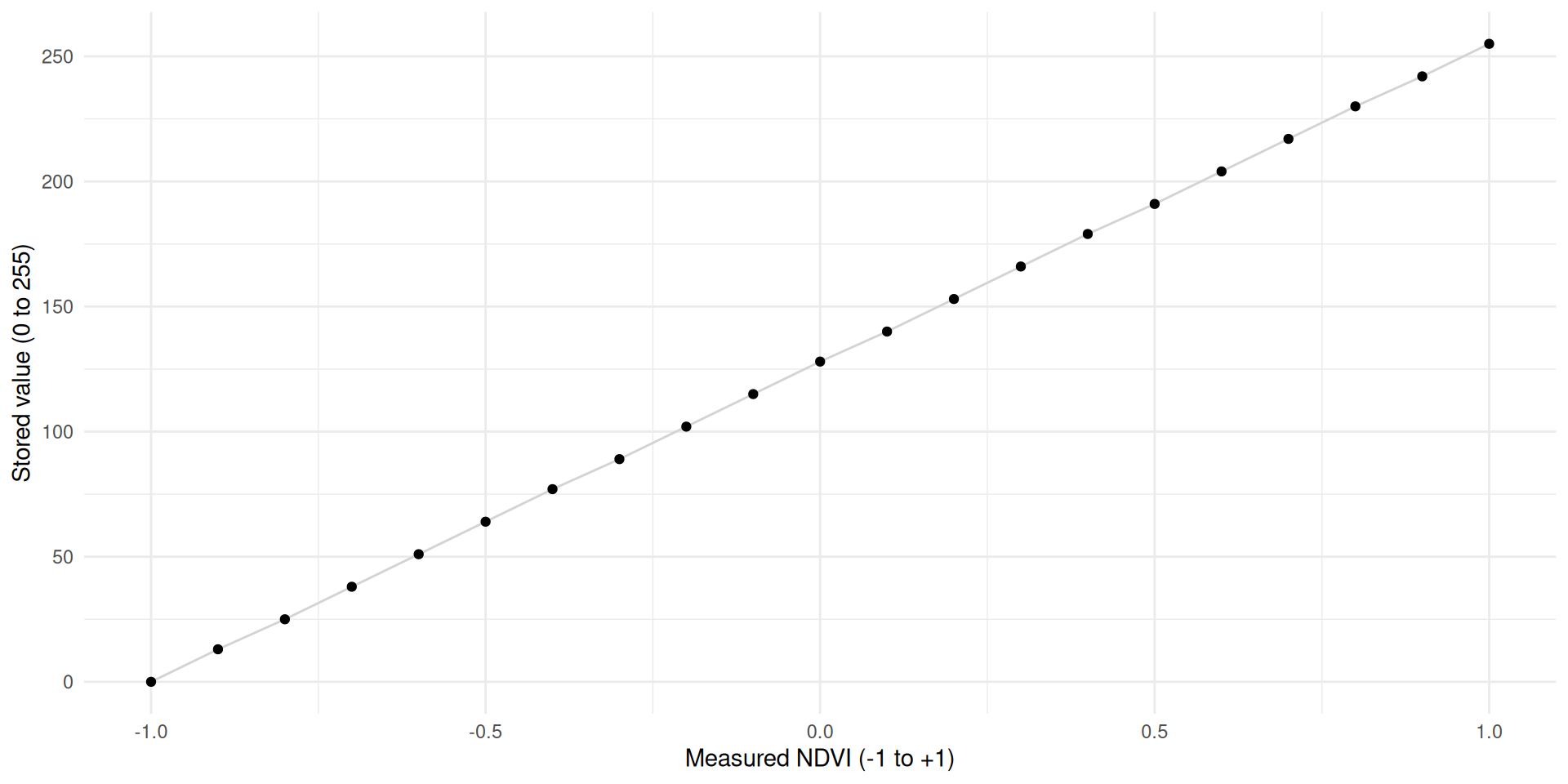
Restoring original values
- The transform \(x' = 127.5\,x + 127.5\) is reversible
- Invert the function to recover originals: \(x = \dfrac{x' - 127.5}{127.5}\)
- More generally: two parameters describe the transform —
scaleandoffset - Ideally transformation of values is not done within the R / Python session. Best practice:
- GDAL transforms values during writing
- GDAL stores scale and offset in the file metadata
- GDAL restores the original values on read
- However, this is not always the case “in the wild”
GDAL scale/offset in R
terra::writeRastersupportsscale =andoffset =arguments — it transforms on write, inverts on read.- The user needs to know (calculate) these values beforehand
- The formula to determine
scaleandoffsetcan be derived by the min-max formula
\[\text{scale} = \frac{b - a}{\max(x) - \min(x)}, \qquad \text{offset} = \frac{a\,\max(x) - b\,\min(x)}{\max(x) - \min(x)}\]
- 1
-
writeRasterdivides byscale:stored = (x − offset) / scale - 2
-
writeRastersubtractsoffset; fora = 0this simplifies tomin_x - 3
-
Use the global min/max function, not per-cell (e.g.
min())
Scale / offset in practice
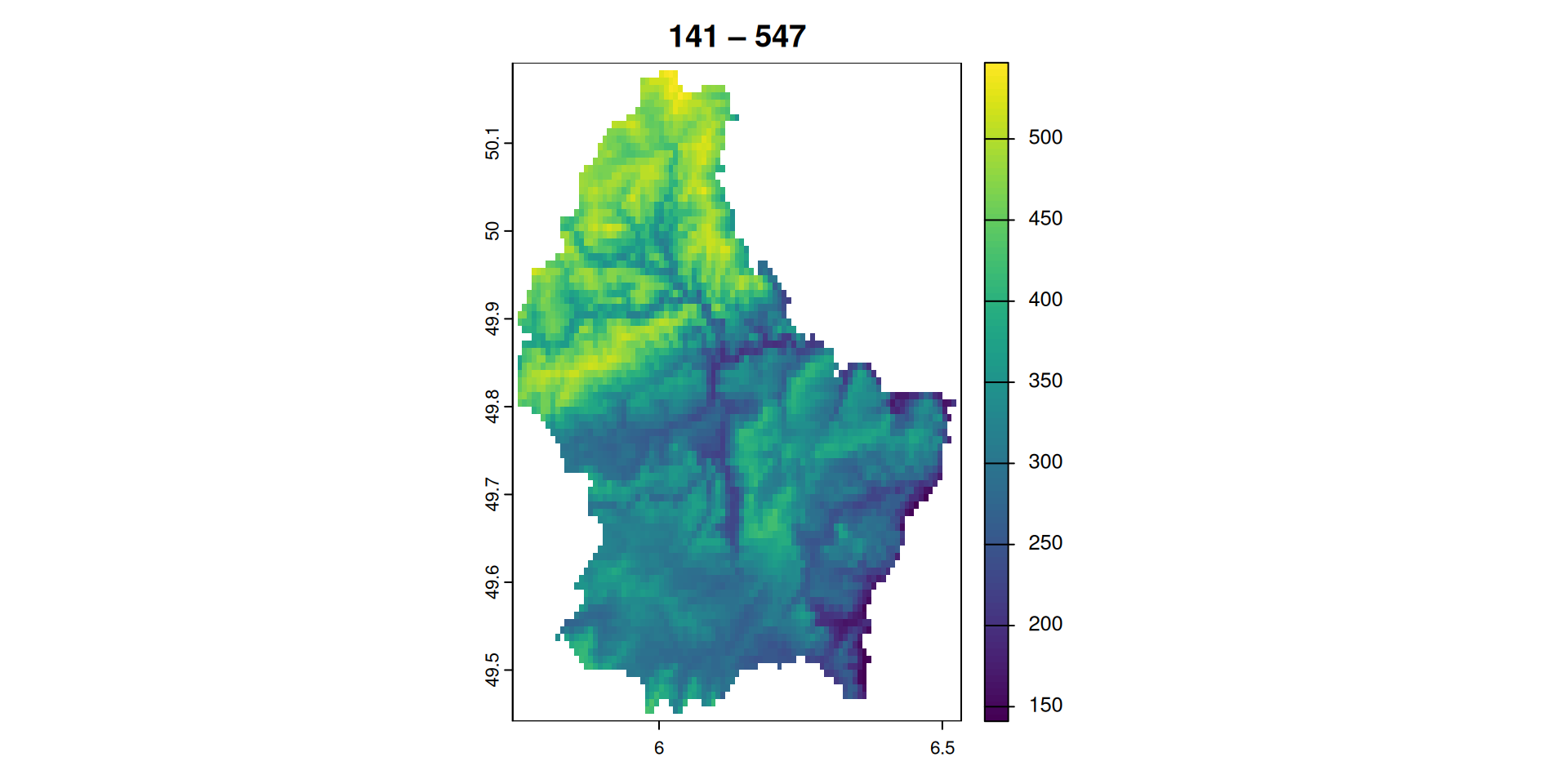
$scale
[1] 1.592157

$offset
[1] 141Scale and offset are visible in the file metadata — any GDAL-powered tool can read them:
gdal raster info
Extracting file (meta) data
gdal raster info
gdal raster infolists information about a raster dataset- We’ll use
elev-lux.tif— a small elevation model of Luxembourg — as our running example
- List all arguments with
--help:
Usage: gdal raster info [OPTIONS] <INPUT>

Return information on a raster dataset.

Positional arguments:
  -i, --dataset, --input <INPUT>                       Input raster dataset [required]

Common Options:
  -h, --help                                           Display help message and exit
  --json-usage                                         Display usage as JSON document and exit
  --config <KEY>=<VALUE>                               Configuration option [may be repeated]

Options:
  -f, --of, --format, --output-format <OUTPUT-FORMAT>  Output format. OUTPUT-FORMAT=json|text (default: json)
  --mm, --min-max                                      Compute minimum and maximum value
  --stats                                              Retrieve or compute statistics, using all pixels
                                                       Mutually exclusive with --approx-stats
  --approx-stats                                       Retrieve or compute statistics, using a subset of pixels
                                                       Mutually exclusive with --stats
  --hist                                               Retrieve or compute histogram

Advanced Options:
  --oo, --open-option <KEY>=<VALUE>                    Open options [may be repeated]
  --if, --input-format <INPUT-FORMAT>                  Input formats [may be repeated]
  --no-gcp                                             Suppress ground control points list printing
  --no-md                                              Suppress metadata printing
  --no-ct                                              Suppress color table printing
  --no-fl                                              Suppress file list printing
  --checksum                                           Compute pixel checksum
  --list-metadata-domains, --list-mdd                  List all metadata domains available for the dataset
  --mdd, --metadata-domain <METADATA-DOMAIN>           Report metadata for the specified domain. 'all' can be used to report metadata in all domains

Esoteric Options:
  --no-nodata                                          Suppress retrieving nodata value
  --no-mask                                            Suppress mask band information
  --subdataset <SUBDATASET>                            Use subdataset of specified index (starting at 1), instead of the source dataset itself

For more details, consult https://gdal.org/programs/gdal_raster_info.html

WARNING: the gdal command is provisionally provided as an alternative interface to GDAL and OGR command line utilities.
The project reserves the right to modify, rename, reorganize, and change the behavior of the utility
until it is officially frozen in a future feature release of GDAL.- Get all metadata and display output as text
Driver: GTiff/GeoTIFF
Files: data/raster-deepdive/elev-lux.tif
       data/raster-deepdive/elev-lux.tif.aux.xml
Size is 95, 90
Coordinate System is:
GEOGCRS["WGS 84",
    ENSEMBLE["World Geodetic System 1984 ensemble",
        MEMBER["World Geodetic System 1984 (Transit)"],
        MEMBER["World Geodetic System 1984 (G730)"],
        MEMBER["World Geodetic System 1984 (G873)"],
        MEMBER["World Geodetic System 1984 (G1150)"],
        MEMBER["World Geodetic System 1984 (G1674)"],
        MEMBER["World Geodetic System 1984 (G1762)"],
        MEMBER["World Geodetic System 1984 (G2139)"],
        MEMBER["World Geodetic System 1984 (G2296)"],
        ELLIPSOID["WGS 84",6378137,298.257223563,
            LENGTHUNIT["metre",1]],
        ENSEMBLEACCURACY[2.0]],
    PRIMEM["Greenwich",0,
        ANGLEUNIT["degree",0.0174532925199433]],
    CS[ellipsoidal,2],
        AXIS["geodetic latitude (Lat)",north,
            ORDER[1],
            ANGLEUNIT["degree",0.0174532925199433]],
        AXIS["geodetic longitude (Lon)",east,
            ORDER[2],
            ANGLEUNIT["degree",0.0174532925199433]],
    USAGE[
        SCOPE["Horizontal component of 3D system."],
        AREA["World."],
        BBOX[-90,-180,90,180]],
    ID["EPSG",4326]]
Data axis to CRS axis mapping: 2,1
Origin = (5.741666666666666,50.191666666666663)
Pixel Size = (0.008333333333333,-0.008333333333333)
Metadata:
  AREA_OR_POINT=Area
Image Structure Metadata:
  COMPRESSION=LZW
  INTERLEAVE=BAND
Corner Coordinates:
Upper Left  (   5.7416667,  50.1916667) (  5d44'30.00"E, 50d11'30.00"N)
Lower Left  (   5.7416667,  49.4416667) (  5d44'30.00"E, 49d26'30.00"N)
Upper Right (   6.5333333,  50.1916667) (  6d32' 0.00"E, 50d11'30.00"N)
Lower Right (   6.5333333,  49.4416667) (  6d32' 0.00"E, 49d26'30.00"N)
Center      (   6.1375000,  49.8166667) (  6d 8'15.00"E, 49d49' 0.00"N)
Band 1 Block=95x43 Type=Int16, ColorInterp=Gray
  Description = elevation
  Min=141.000 Max=547.000
  Minimum=141.000, Maximum=547.000, Mean=-9999.000, StdDev=-9999.000
  NoData Value=-32768
  Metadata:
    STATISTICS_MINIMUM=141
    STATISTICS_MAXIMUM=547
    STATISTICS_MEAN=-9999
STATISTICS_STDDEV=-9999- The metadata output format (
-f) can either betextor tojson - Where text is more human readable,
jsonis structured and machine readable
{
  "description":"data/raster-deepdive/elev-lux.tif",
  "driverShortName":"GTiff",
  "driverLongName":"GeoTIFF",
  "files":[
    "data/raster-deepdive/elev-lux.tif",
    "data/raster-deepdive/elev-lux.tif.aux.xml"
  ],
  "size":[
    95,
    90
  ],
  "coordinateSystem":{
    "wkt":"GEOGCRS[\"WGS 84\",\n    ENSEMBLE[\"World Geodetic System 1984 ensemble\",\n        MEMBER[\"World Geodetic System 1984 (Transit)\"],\n        MEMBER[\"World Geodetic System 1984 (G730)\"],\n        MEMBER[\"World Geodetic System 1984 (G873)\"],\n        MEMBER[\"World Geodetic System 1984 (G1150)\"],\n        MEMBER[\"World Geodetic System 1984 (G1674)\"],\n        MEMBER[\"World Geodetic System 1984 (G1762)\"],\n        MEMBER[\"World Geodetic System 1984 (G2139)\"],\n        MEMBER[\"World Geodetic System 1984 (G2296)\"],\n        ELLIPSOID[\"WGS 84\",6378137,298.257223563,\n            LENGTHUNIT[\"metre\",1]],\n        ENSEMBLEACCURACY[2.0]],\n    PRIMEM[\"Greenwich\",0,\n        ANGLEUNIT[\"degree\",0.0174532925199433]],\n    CS[ellipsoidal,2],\n        AXIS[\"geodetic latitude (Lat)\",north,\n            ORDER[1],\n            ANGLEUNIT[\"degree\",0.0174532925199433]],\n        AXIS[\"geodetic longitude (Lon)\",east,\n            ORDER[2],\n            ANGLEUNIT[\"degree\",0.0174532925199433]],\n    USAGE[\n        SCOPE[\"Horizontal component of 3D system.\"],\n        AREA[\"World.\"],\n        BBOX[-90,-180,90,180]],\n    ID[\"EPSG\",4326]]",
    "dataAxisToSRSAxisMapping":[
      2,
      1
    ]
  },
  "geoTransform":[
    5.7416666666666663,
    0.0083333333333333,
    0.0,
    50.1916666666666629,
    0.0,
    -0.0083333333333333
  ],
  "metadata":{
    "":{
      "AREA_OR_POINT":"Area"
    },
    "IMAGE_STRUCTURE":{
      "COMPRESSION":"LZW",
      "INTERLEAVE":"BAND"
    }
  },
  "cornerCoordinates":{
    "upperLeft":[
      5.7416667,
      50.1916667
    ],
    "lowerLeft":[
      5.7416667,
      49.4416667
    ],
    "lowerRight":[
      6.5333333,
      49.4416667
    ],
    "upperRight":[
      6.5333333,
      50.1916667
    ],
    "center":[
      6.1375,
      49.8166667
    ]
  },
  "wgs84Extent":{
    "type":"Polygon",
    "coordinates":[
      [
        [
          5.7416667,
          50.1916667
        ],
        [
          5.7416667,
          49.4416667
        ],
        [
          6.5333333,
          49.4416667
        ],
        [
          6.5333333,
          50.1916667
        ],
        [
          5.7416667,
          50.1916667
        ]
      ]
    ]
  },
  "bands":[
    {
      "band":1,
      "block":[
        95,
        43
      ],
      "type":"Int16",
      "colorInterpretation":"Gray",
      "description":"elevation",
      "min":141.0,
      "max":547.0,
      "minimum":141.0,
      "maximum":547.0,
      "mean":-9999.0,
      "stdDev":-9999.0,
      "noDataValue":-32768,
      "metadata":{
        "":{
          "STATISTICS_MINIMUM":"141",
          "STATISTICS_MAXIMUM":"547",
          "STATISTICS_MEAN":"-9999",
          "STATISTICS_STDDEV":"-9999"
        }
      }
    }
  ],
  "stac":{
    "proj:shape":[
      90,
      95
    ],
    "proj:wkt2":"GEOGCRS[\"WGS 84\",\n    ENSEMBLE[\"World Geodetic System 1984 ensemble\",\n        MEMBER[\"World Geodetic System 1984 (Transit)\"],\n        MEMBER[\"World Geodetic System 1984 (G730)\"],\n        MEMBER[\"World Geodetic System 1984 (G873)\"],\n        MEMBER[\"World Geodetic System 1984 (G1150)\"],\n        MEMBER[\"World Geodetic System 1984 (G1674)\"],\n        MEMBER[\"World Geodetic System 1984 (G1762)\"],\n        MEMBER[\"World Geodetic System 1984 (G2139)\"],\n        MEMBER[\"World Geodetic System 1984 (G2296)\"],\n        ELLIPSOID[\"WGS 84\",6378137,298.257223563,\n            LENGTHUNIT[\"metre\",1]],\n        ENSEMBLEACCURACY[2.0]],\n    PRIMEM[\"Greenwich\",0,\n        ANGLEUNIT[\"degree\",0.0174532925199433]],\n    CS[ellipsoidal,2],\n        AXIS[\"geodetic latitude (Lat)\",north,\n            ORDER[1],\n            ANGLEUNIT[\"degree\",0.0174532925199433]],\n        AXIS[\"geodetic longitude (Lon)\",east,\n            ORDER[2],\n            ANGLEUNIT[\"degree\",0.0174532925199433]],\n    USAGE[\n        SCOPE[\"Horizontal component of 3D system.\"],\n        AREA[\"World.\"],\n        BBOX[-90,-180,90,180]],\n    ID[\"EPSG\",4326]]",
    "proj:epsg":4326,
    "proj:projjson":{
      "$schema":"https://proj.org/schemas/v0.7/projjson.schema.json",
      "type":"GeographicCRS",
      "name":"WGS 84",
      "datum_ensemble":{
        "name":"World Geodetic System 1984 ensemble",
        "members":[
          {
            "name":"World Geodetic System 1984 (Transit)",
            "id":{
              "authority":"EPSG",
              "code":1166
            }
          },
          {
            "name":"World Geodetic System 1984 (G730)",
            "id":{
              "authority":"EPSG",
              "code":1152
            }
          },
          {
            "name":"World Geodetic System 1984 (G873)",
            "id":{
              "authority":"EPSG",
              "code":1153
            }
          },
          {
            "name":"World Geodetic System 1984 (G1150)",
            "id":{
              "authority":"EPSG",
              "code":1154
            }
          },
          {
            "name":"World Geodetic System 1984 (G1674)",
            "id":{
              "authority":"EPSG",
              "code":1155
            }
          },
          {
            "name":"World Geodetic System 1984 (G1762)",
            "id":{
              "authority":"EPSG",
              "code":1156
            }
          },
          {
            "name":"World Geodetic System 1984 (G2139)",
            "id":{
              "authority":"EPSG",
              "code":1309
            }
          },
          {
            "name":"World Geodetic System 1984 (G2296)",
            "id":{
              "authority":"EPSG",
              "code":1383
            }
          }
        ],
        "ellipsoid":{
          "name":"WGS 84",
          "semi_major_axis":6378137,
          "inverse_flattening":298.257223563
        },
        "accuracy":"2.0",
        "id":{
          "authority":"EPSG",
          "code":6326
        }
      },
      "coordinate_system":{
        "subtype":"ellipsoidal",
        "axis":[
          {
            "name":"Geodetic latitude",
            "abbreviation":"Lat",
            "direction":"north",
            "unit":"degree"
          },
          {
            "name":"Geodetic longitude",
            "abbreviation":"Lon",
            "direction":"east",
            "unit":"degree"
          }
        ]
      },
      "scope":"Horizontal component of 3D system.",
      "area":"World.",
      "bbox":{
        "south_latitude":-90,
        "west_longitude":-180,
        "north_latitude":90,
        "east_longitude":180
      },
      "id":{
        "authority":"EPSG",
        "code":4326
      }
    },
    "proj:transform":[
      5.7416666666666663,
      0.0083333333333333,
      0.0,
      50.1916666666666629,
      0.0,
      -0.0083333333333333
    ],
    "raster:bands":[
      {
        "data_type":"int16",
        "stats":{
          "minimum":141.0,
          "maximum":547.0,
          "mean":-9999.0,
          "stddev":-9999.0
        },
        "nodata":-32768
      }
    ],
    "eo:bands":[
      {
        "name":"b1",
        "description":"elevation"
      }
    ]
  }
}- JSON in turn can be parsed using
jq— a lightweight command-line JSON processor- Navigates JSON with
.key(field access) and[](array iteration) - Install:
conda install -c conda-forge jq
- Navigates JSON with
Extract a single field — .bands[] iterates over bands, .min selects the field:
gdal raster info: terminal histogram
Extract histogram buckets and visualise with bashplotlib:
 19|  +
 18|  +
 17|  +
 16|  +
 15|  +
 14|  +
 13|  +
 12|  +    +
 11|  +    +
 10| ++ ++ +
  9| ++ ++++                  + +
  8| +++++++  +               + +
  7| ++++++++ ++++ +    ++    + +
  6| ++++++++ ++++ +   +++    + +
  5| +++++++++++++ +  ++++    + ++ +
  4| ++++++++++++++++ ++++++  + ++ ++     +
  3| +++++++++++++++++++++++ ++ ++ ++   + +  + +         +  +
  2| +++++++++++++++++++++++++++++ ++++ + + ++ + +   +   +  + +
  1| ++++++++++++++++++++++++++++++++++ ++++++++ + +++  +++ +++ + +  +   ++
----------------------------------------------------------------------NoData in rasters
NoData in rasters
- Raster files have no explicit null type — every cell must hold a numeric value
- To mark cells as missing, a two-step approach is used:
- Assign a reserved value within the datatype’s range (e.g. the maximum possible value)
- Label that value as
NoDatain the file metadata
→ Any software reading the file interprets that reserved value as missing, not as a real measurement
NoData & data types
For integer types, the reserved value must fit within the datatype’s range:
| Datatype | Common NoData reserved value |
|---|---|
Byte |
255 (max value) |
Int16 |
−32,768 (min value) |
Float321 |
NaN or −9999 |
Risk (integer types): if real data happens to contain the reserved value → those cells silently become NoData
NoData in terra
Inspect and set the NoData flag:
# Only use 0 - 254, so that 255 is availalable for "NoData"
so <- get_scale_offset(elev, a = 0, b = 254)

# write with an explicit NoData flag
writeRaster(elev, "data-out/elev_naflag.tif", datatype = "INT1U", overwrite = TRUE,
            scale = so$scale, offset = so$offset, NAflag = 255)

# read back — terra interprets 255 as NA automatically
elev_back <- rast("data-out/elev_naflag.tif")
plot(elev_back, colNA = "black")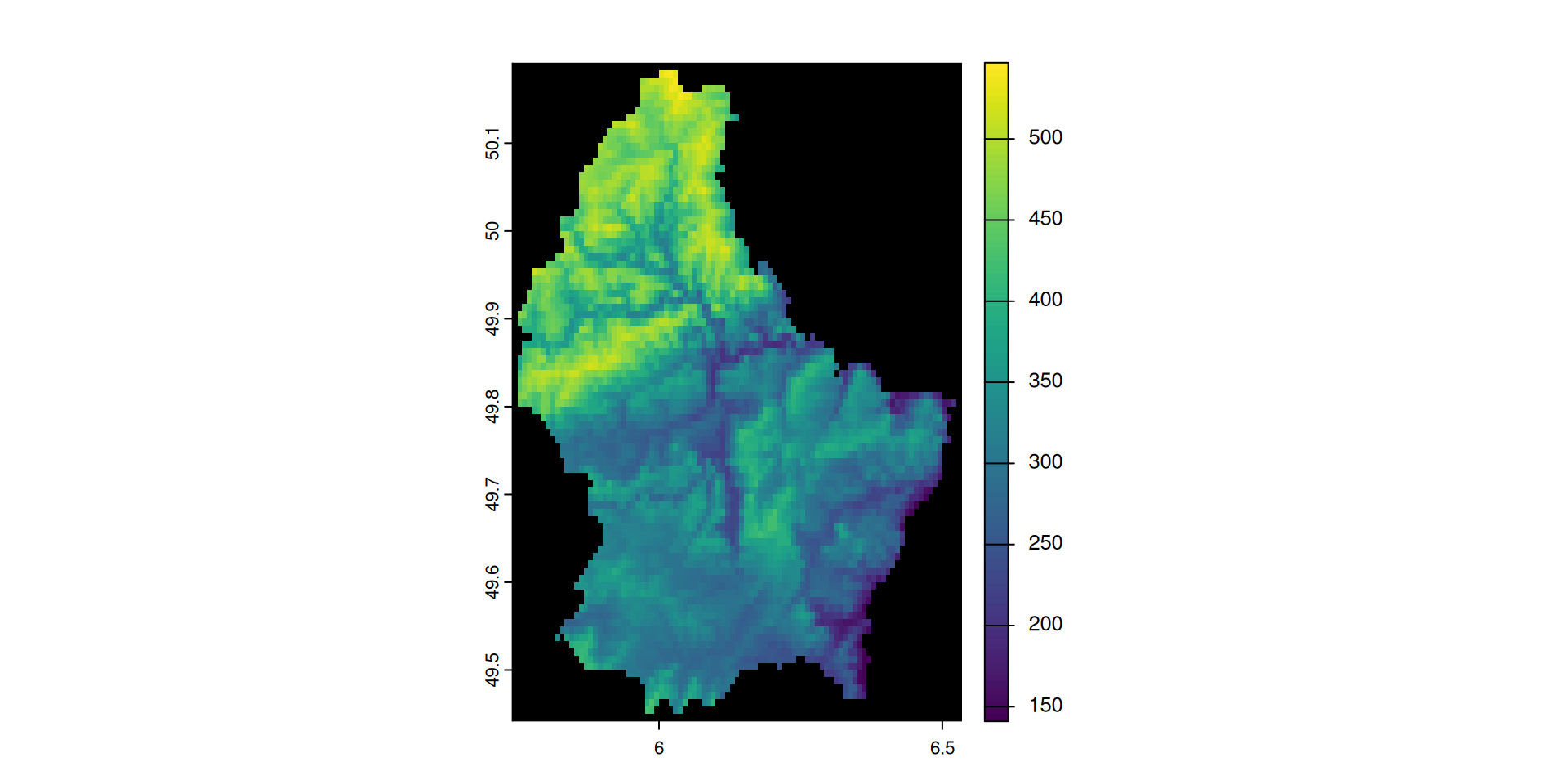
Note that the maximum elevation values are now NA
The reserved value and its NoData label are both visible in the metadata:
Categorical rasters
Categorical rasters
- Some raster data is categorical, not continuous: land use, soil type, vegetation class, …
- Raster files cannot store text — categories are encoded as integers
- The mapping (integer code → category label) is stored in the file metadata as an attribute table
→ Analogous to R’s factor: an underlying integer + a levels table
→ Choose the smallest integer type that covers the number of categories — Byte handles up to 255 classes
Categorical rasters in terra
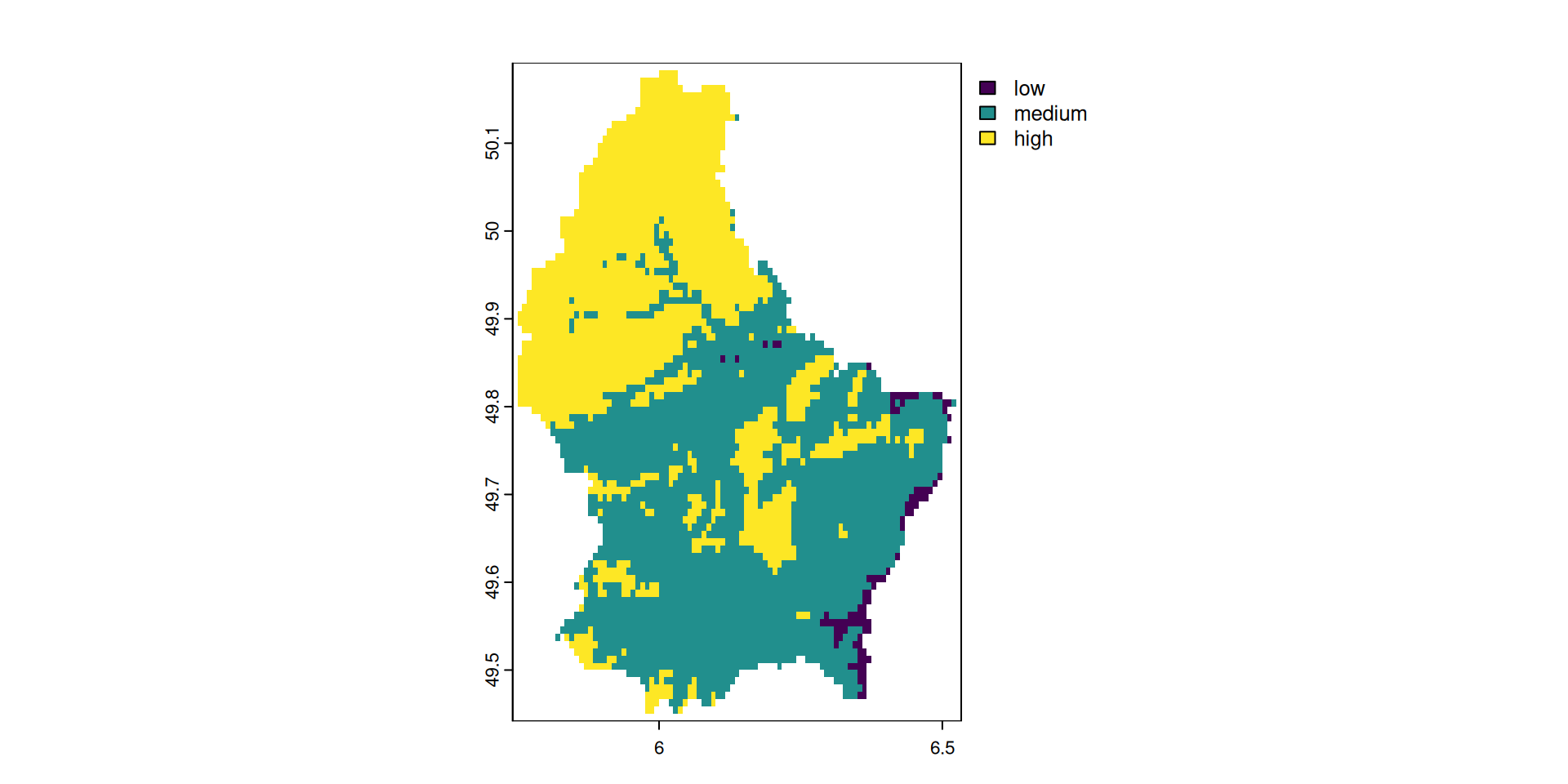
- 1
-
Reclassify values into three categories (
0-200,200-350and350-550) - 2
-
Relable the default classes to
low,mediumandhigh
Compression
Raster file size
- File size = dimensions × bands × bytes per pixel
- Example: single SRTM tile, one band,
Int16(2 bytes/pixel):
\[3601 \times 3601 \times 2\,\text{B} = 25{,}934{,}402\,\text{B} \approx 25.9\,\text{MB}\]
- Compression reduces storage by exploiting spatial redundancy in pixel values
Lossless vs lossy
| Lossless | Lossy | |
|---|---|---|
| Data preserved? | Perfectly | Approximated |
| Use case | Scientific data (DEM, multispectral) | Photographic / visual imagery |
| Examples | LZW, DEFLATE, ZSTD, PACKBITS | JPEG2000, WEBP |
→ For scientific analysis always use lossless — lossy compression permanently alters pixel values
How compression works
Exploit repeated values — store each unique value once, track its positions:
| Original | 100, 101, 102, 100, 100 |
| Compressed | 100 → positions [0, 3, 4] 101 → positions [1] 102 → positions [2] |
→ 5 values encoded as 3 unique values + a position list
Works best when data contains many repeated or near-repeated values (flat terrain, uniform land cover)
PREDICTOR
LZW, DEFLATE, and ZSTD can use a predictor to improve compression further:
→ Store differences between consecutive values instead of absolute values
| Original | 100 |
101 |
102 |
100 |
100 |
| With predictor | 100 |
+1 |
+1 |
−2 |
0 |
Small differences compress better than large absolute values
| Option | Use for |
|---|---|
PREDICTOR=1 |
No predictor (default) |
PREDICTOR=2 |
Integer data (e.g. DEMs) |
PREDICTOR=3 |
Float data |
Tiling & compression costs
- By default, GeoTIFF stores data line by line (strip layout)
TILED=YESstores data in 256 × 256 pixel blocks
→ Tiling improves random-access reads and is essential for Cloud-Optimized GeoTIFF (COG)
Compression is not free:
- Adds CPU overhead on write and read
- Good default for most scientific workflows:
DEFLATE+TILED=YES
gdal raster convert
gdal raster convert converts raster files between formats and applies compression:
Usage: gdal raster convert [OPTIONS] <INPUT> <OUTPUT>

Convert a raster dataset.

Positional arguments:
  -i, --input <INPUT>                                  Input raster dataset [required]
  -o, --output <OUTPUT>                                Output raster dataset (created by algorithm) [required]

Common Options:
  -h, --help                                           Display help message and exit
  --json-usage                                         Display usage as JSON document and exit
  --config <KEY>=<VALUE>                               Configuration option [may be repeated]
  --progress                                           Display progress bar

Options:
  -f, --of, --format, --output-format <OUTPUT-FORMAT>  Output format
  --co, --creation-option <KEY>=<VALUE>                Creation option [may be repeated]
  --overwrite                                          Whether overwriting existing output is allowed
                                                       Mutually exclusive with --append
  --append                                             Append as a subdataset to existing output
                                                       Mutually exclusive with --overwrite

Advanced Options:
  --oo, --open-option <KEY>=<VALUE>                    Open options [may be repeated]
  --if, --input-format <INPUT-FORMAT>                  Input formats [may be repeated]

For more details, consult https://gdal.org/programs/gdal_raster_convert.html

WARNING: the gdal command is provisionally provided as an alternative interface to GDAL and OGR command line utilities.
The project reserves the right to modify, rename, reorganize, and change the behavior of the utility
until it is officially frozen in a future feature release of GDAL.
Key points:
- Two positional arguments:
<input_file><output_file> - Compression via
--co KEY=VALUE(creation options) - Options are format-specific — always check
--help
gdal raster convert: baseline
| File | Size (MB) | Difference |
|---|---|---|
| Original (ASCII) | 824.43 | 0 % |
| GeoTIFF, no compression | 535.91 | -35 % |
gdal raster convert: + DEFLATE
| File | Size (MB) | Difference |
|---|---|---|
| Original (ASCII) | 824.43 | 0 % |
| GeoTIFF, no compression | 535.91 | -35 % |
COMPRESS=DEFLATE |
208.24 | -75 % |
gdal raster convert: + TILED
| File | Size (MB) | Difference |
|---|---|---|
| Original (ASCII) | 824.43 | 0 % |
| GeoTIFF, no compression | 535.91 | -35 % |
COMPRESS=DEFLATE |
208.24 | -75 % |
TILED=YES |
177.50 | -78 % |
gdal raster convert: + PREDICTOR
| File | Size (MB) | Difference |
|---|---|---|
| Original (ASCII) | 824.43 | 0 % |
| GeoTIFF, no compression | 535.91 | -35 % |
COMPRESS=DEFLATE |
208.24 | -75 % |
TILED=YES |
177.50 | -78 % |
PREDICTOR=3 |
150.89 | -82 % |
gdal raster reproject
gdal raster info: get CRS
To reproject a raster, we need to know the source CRS. Is this information available?
→ No CRS — consult the data provider: DHM25 uses LV03/LN02 = EPSG:21781
Confirm via corner coordinates:
gdal raster reproject
gdal raster reprojectreprojects and transforms raster data- Two positional arguments:
<input>and<output>
Usage: gdal raster reproject [OPTIONS] <INPUT> <OUTPUT>

Reproject a raster dataset.

Positional arguments:
  -i, --input <INPUT>                                  Input raster dataset [required]
  -o, --output <OUTPUT>                                Output raster dataset [required]

Common Options:
  -h, --help                                           Display help message and exit
  --json-usage                                         Display usage as JSON document and exit
  --config <KEY>=<VALUE>                               Configuration option [may be repeated]
  --progress                                           Display progress bar

Options:
  -f, --of, --format, --output-format <OUTPUT-FORMAT>  Output format ("GDALG" allowed)
  --co, --creation-option <KEY>=<VALUE>                Creation option [may be repeated]
  --overwrite                                          Whether overwriting existing output is allowed
  -s, --src-crs <SRC-CRS>                              Source CRS
  -d, --dst-crs <DST-CRS>                              Destination CRS
  -r, --resampling <RESAMPLING>                        Resampling method. RESAMPLING=nearest|bilinear|cubic|cubicspline|lanczos|average|rms|mode|min|max|med|q1|q3|sum (default: nearest)
  --resolution <xres>,<yres>                           Target resolution (in destination CRS units)
                                                       Mutually exclusive with --size
  --size <width>,<height>                              Target size in pixels
                                                       Mutually exclusive with --resolution
  --bbox <BBOX>                                        Target bounding box (in destination CRS units)
  --bbox-crs <BBOX-CRS>                                CRS of target bounding box

Advanced Options:
  --if, --input-format <INPUT-FORMAT>                  Input formats [may be repeated]
  --oo, --open-option <KEY>=<VALUE>                    Open options [may be repeated]
  --target-aligned-pixels                              Round target extent to target resolution
  --src-nodata <SRC-NODATA>                            Set nodata values for input bands ('None' to unset). [1.. values]
  --dst-nodata <DST-NODATA>                            Set nodata values for output bands ('None' to unset). [1.. values]
  --add-alpha                                          Adds an alpha mask band to the destination when the source raster have none.
  --wo, --warp-option <NAME>=<VALUE>                   Warping option(s) [may be repeated]
  --to, --transform-option <NAME>=<VALUE>              Transform option(s) [may be repeated]
  --et, --error-threshold <ERROR-THRESHOLD>            Error threshold

For more details, consult https://gdal.org/programs/gdal_raster_reproject.html

WARNING: the gdal command is provisionally provided as an alternative interface to GDAL and OGR command line utilities.
The project reserves the right to modify, rename, reorganize, and change the behavior of the utility
until it is officially frozen in a future feature release of GDAL.
gdal raster reproject: reproject
DHM25 has no embedded CRS → specify source and target explicitly:
0...10...20...30...40...50...60...70...80...90...100 - done.gdal raster reproject: verify
Compare before and after — coordinates should shift from LV03 to LV95 range:
Bringing it all together
Three tools, one goal
All three strategies reduce on-disk file size — but they work at different levels:
| Tool | Targets | Mechanism |
|---|---|---|
| Datatype | Per-pixel cost | 1 byte (Byte) vs 4 bytes (Float32) |
| Scale / offset | Value range | Rescale floats to fit a smaller integer type |
| Compression | Spatial redundancy | Exploit repeated values across pixels |
→ They are complementary — apply all three for maximum effect
→ Order matters: choose datatype first, then compress
Practical checklist
When writing a raster to disk:
- What is my value range? → choose the smallest datatype that fits
- Can I rescale to fit an integer type? → use
scale/offsetinwriteRaster - Are there missing cells? → set
NAflag(integer types) or use NaN (float types) - Apply lossless compression:
COMPRESS=DEFLATE+TILED=YES- Add
PREDICTOR=2for integer data,PREDICTOR=3for float data
- Add
Default recommendation for most scientific rasters:
INT1U / Int16 + scale/offset + DEFLATE + TILED=YES + PREDICTOR=2References
Amatulli, Giuseppe. 2024. Geocomputation and Machine Learning for Environmental Applications. Http://spatial-ecology.net/docs/build/html/GDAL/gdal_osgeo.html.
Gandhi, Ujaval. 2020. Mastering GDAL Tools (Full Course). Https://courses.spatialthoughts.com/gdal-tools.html#compressing-output.